The Discovery Building contains the Wisconsin Institute for Discovery (WID), Morgridge Institute for Research (Morgridge), and the Town Center (managed by WARF). The Town Center’s website contains information on the building’s hours, parking and restaurants.
Building Information
Safety Links & Information
Building FAQ
DiscoverIT maintains instructions for connecting your iPhone or Android device at: https://kb.wisc.edu/discovery/69548
DiscoverIT supports 12 printers for use by Discovery Building occupants. This includes a color scanner/printer per kitchenette and 2 44” plotters for posters. Documentation on connecting to these printers is available on the Discovery Building KB: kb.wisc.edu/discovery/search.php?cat=6306. Each non-poster print project is first submitted to the print queue before you pick it up at one of the printers by signing in with your WisCard. If your printing project is not related to WID or WID research, use one of the other campus printing options (it.wisc.edu/services/printing/).
Color Printing Notification
If you’ve been printing significant amounts of color print jobs, you may receive the following email:
You are receiving this email because you printed more than 100 color pages over the last several weeks at WID. Please be aware that color printing costs 7x more than black and white. We understand that color printing is sometimes necessary, but please make sure your default printing is black and white:
- Create a Black and White Printing Preset on Mac
- Set up two print queues (B&W, color) for a PC
- Printing for Ubuntu Linux
Some large color print jobs, such as brochures and handouts, are best done by the campus print shops. We use them routinely as they have fast turnaround and their printers are better quality. Pat Pointer can answer any questions you have.
The Office of the Secretary of the Faculty maintains the Academic Calendar for the University of Wisconsin–Madison.
-
Federal agents are free to enter any public areas on campus, including most of the first floor of the Discovery Building. They must have a valid search warrant to enter a non-public area. Do not give your consent to allow an agent to enter a non-public area. Any areas of the Discovery Building that are accessed by a Wiscard are not public areas.
-
Stay calm. Take enough time for yourself to think through and formulate your answers.
-
If the agent approaches a WID student worker, the student should immediately get their supervisor and/or Sheila O’Brien (608-316-4338) at WID.
-
Ask the agent for their name and to see their government issued badge. Most likely the agent will show you their badge without you asking. If not, it is your right to ask for this.
-
Verify the agent’s identity and agency with badge.
-
Ask the agent why they are on campus if they have not shared that information already.
-
Ask the agent to have a seat in a public area of the first floor of the Discovery Building while you call the appropriate contact (UW’s Office of Legal Affairs). To be clear: do not give your consent to allow an agent to enter a non-public area even if they have a valid search warrant. Politely tell the agent to wait while you call the proper contact.
-
Immediately call the Office of Legal Affairs at (608) 263-7400 and ask to speak with one of the attorneys. The OLA office number is answered 24 hours per day, 7 days per week. Please also contact Sheila O’Brien at 608-316-4338, sgobrien@wisc.edu. If an agent is inquiring about someone who works for the Morgridge Institute for Research, the contact is Director of Human Resources Jill Walder, 608-316-4493.
The Discovery Building phones are part of the Campus, Cisco VoIP program.
Their dialing patterns are:
| Call Type | Pattern | Example |
|---|---|---|
| Campus or local state agency | seven-digit number | 262-4357 |
| Local calls | 1 and seven-digit local number | 1-555-1234 |
| Toll-free calls | 1 and 1 and ten-digit number | 1-1-800-555-1234 |
| Long distance calls | 1 and 1 and ten-digit number | 1-1-212-555-1234 |
| International call to a country in the North American Dialing Plan (like Canada, Jamaica) Note: International calling must be enabled per phone line. |
1 and 1 and ten-digit number | 1-1-416-555-1234 |
| International call to all other countries Note: International calling must be enabled per phone line. |
1 and 011 and country code and city/area code and number | 1 011 44 303 123 7300 |
| Emergency call | 911 | 911 |
| Block caller ID local call | 1 and *67 and seven-digit local number | 1-*67-555-1234 |
| Block caller ID long-distance call | 1 and *67 and 1 and ten-digit number | 1-*67-1-212-555-1234 |
| Public Service Call | 1 and 3-digit number | 1-211 |
UW-Madison
If you no longer have a UW-Madison affiliation, IT services like:
- Office 365
- Zoom
- Box
- Qualtrics
will be deactivated according to UW timelines as shown in https://kb.wisc.edu/79844. If you need these to be extended because of ongoing work with WID, contact Johnny Wertz as soon as possible.
Discovery Building Access
Discovery Building access will remain active until the campus disables your UWID or your access is removed by your lab manager or Principal Investigator.
DiscoverIT Resources
Once your lab manager or PI identifies that you have left WID, you will receive an email with the account deactivation process. You will have two weeks to return equipment and copy data. Once two weeks have passed, your IT account and building access will be locked. If you do not join a lab within six months, your IT account and affiliated files will be deleted.
DiscoverIT Help Desk
The DiscoverIT Help Desk provides IT support within the Discovery Building.
Please contact Sheila O’Brien. The building’s furniture policy is here.
Please call Physical Plant Customer Service at 263-3333 and follow the prompt to speak with a live person.
Place a work order for non-urgent repairs, maintenance requests, and building concerns.
If there is an emergency, please call 911.
If you are injured at work or develop a work-related illness, you should immediately seek medical care and notify your supervisor and/or lab manager.
Employees must complete an Employee’s Work Injury and Illness Report within 24 hours of an injury or illness. Email the completed form to Johnny Wertz.
Supervisors must complete a Supervisor Incident Analysis and Prevention Report within 1 work day of learning about an employee’s work-related injury or illness. Email the completed form to Johnny Wertz.
Have a question or concern about building safety? Contact Erin Badger
Breastfeeding moms can pump in the parenting room, B1287. Sign up for a time slot at conference-rooms.discovery.wisc.edu.
Discovery Building Training is available at uwmadison.co1.qualtrics.com/jfe/form/SV_3dVbLkD751b363Y.
First Aid Kits
Locations:
Each lab has 2 first aid kits
Each kitchenette has 1 first aid kit
The Town Center has 1 first aid kit
The Discovery Building EHS Specialist checks the kits in the kitchenettes and Town Center on a regular basis and refills contents as necessary. Labs are responsible for checking and maintaining their kits.
If you have questions, contact the EHS Specialist (DiscoveryEHS@warf.org)
Automated External Defibrillators (AEDs)
An automated external defibrillator (or AED) is a portable electronic device that is used to treat sudden cardiac arrest (SCA). SCA is a condition in which the heart suddenly and unexpectedly stops beating. The AED checks the heart rhythm and, if needed, can send an electric shock to the heart to try and restore normal rhythm.
Locations:
Outside room B1166
Town Center Restroom Corridor
3rd floor Restroom Corridor
The EHS Specialist is responsible for the monthly check of the unit.
Utility Emergencies
If you experience a utility failure or malfunction, call PPCS (263-3333) immediately.
Examples: Power failure, water leak, loss of water, heating or air conditioning issues, etc.
Call PPCS (Physical Plant Customer Service) at 263-3333 and speak with a live person (do not leave a voicemail) if you have an issue that needs to be addressed urgently.
If calling PPCS after-hours, dial 0 after the prompt to be connected to UW Police and Security who will assist by assessing the situation and contacting the appropriate staff.
Packages for WID should be addressed to 330 N Orchard St. All deliveries must go to the Loading Dock behind Morgridge Hall. Items cannot be delivered, held, or picked up at the Discovery Welcome Desk.
- Location: Johnson St side of Morgridge Hall, 1262 W Johnson St.
- Hours: Monday – Friday, 7:30am – 3:30pm
- Contact: Louis Allan, louis.allan@wisc.edu
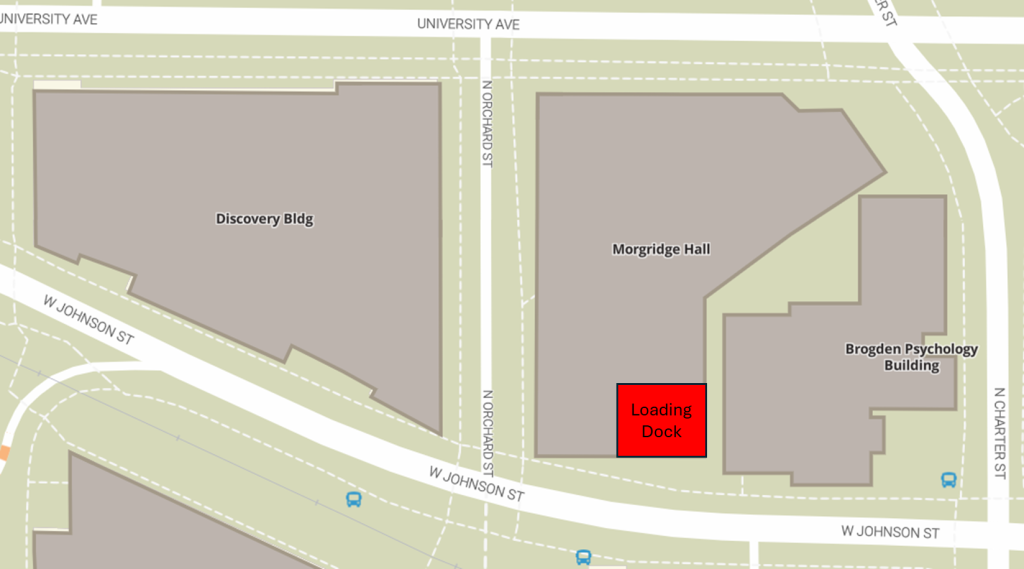
Click here for a document that you can share with vendors or suppliers.
The stockroom is in the lower level next to the main elevators. Click here to find out more about the supplies and services in the stockroom.
Here is a list of WID Shared Equipment, how it is scheduled, and who you should contact for use.