- All
- Catering
- Communications
- Discovery Building
- Events
- Grants
- Human Resources
- IT
- Onboarding
- Policy
- Purchasing
- Research
- Safety
- Travel and Reimbursement
The UW provides enterprise licensed cloud services, university-wide file storage, and department or lab-specific solutions. Most fee-for-service UW storage options are allocated PI-by-PI within their home department, not WID.
Box: https://it.wisc.edu/services/box/
UW–Madison provides free online file storage and collaboration service using Box cloud file storage. Box provides a place to store and access files needed for active collaboration, integrated within process workflows. All new individual Box accounts and project directories are provisioned with a 50GB storage quota. UW–Madison Box should not be used for long-term storage or a backup repository.
Google Workspace: https://it.wisc.edu/services/google-workspace/
UW–Madison Google Workspace is a collection of cloud-based productivity and collaborative tools including: Google Drive, Shared Drives, Docs, Sheets, Gemini, NotebookLM and more.
OneDrive for Business: https://kb.wisc.edu/74569
OneDrive for Business is Microsoft 365’s secure cloud storage service. It allows you to:
- Store work files in the cloud
- Access files from anywhere, on any device
- Share files securely with coworkers and external partners
- Collaborate in real time using Microsoft apps like Word, Excel, and PowerPoint
ResearchDrive: https://it.wisc.edu/services/researchdrive/
Provides secure, shareable storage space on the UW–Madison campus network. ResearchDrive is a university-wide file storage solution for Faculty PIs, permanent PIs, and their research group members. It is suited for a variety of research purposes, including backup, archive, storage for data inputs/outputs of research computing and others. It is a secure and permanent place for keeping data.
The following options are supported directly by campus and are generally used by departments or administrators.
Block: https://it.wisc.edu/services/storage-block/
Bucky Backup: https://it.wisc.edu/services/backup-bucky-backup/
Bucky Backup is a flexible backup and recovery solution that utilizes IBM’s Storage Protect (formerly Spectrum Protect).
File: https://it.wisc.edu/services/storage-file/
Object/S3: https://it.wisc.edu/services/storage-object-s3/
UW Cloud Services supports several public cloud computing services. These services are all documented in the same Knowledgebase: https://kb.wisc.edu/public-cloud/.
- Amazon Web Services: https://it.wisc.edu/services/amazon-web-services/
- Google Cloud Platform: https://it.wisc.edu/services/google-cloud-platform/
- Microsoft Azure: https://it.wisc.edu/services/microsoft-azure/
Information on reporting an incident related to UW Cybersecurity is available at:
https://it.wisc.edu/reporting-an-incident-to-it-security/
It is important that you directly communicate via phone or chat with the DoIT Help Desk or the Network Operations Center (NOC). If the Help Desk is closed, press 0 for “report to NOC” to ensure that your incident has been received.
Eduroam Wi-Fi is available across campus and in the Discovery Building. For specific instructions using your UW NetID, see https://it.wisc.edu/services/wireless-eduroam/.
Eduroam is a secure, worldwide, federated network access service developed for the international research and education community. It allows affiliates from participating institutions to obtain Internet connectivity on the UW–Madison campus and when visiting any of the eduroam-enabled institutions around the world.
WID Access allows PIs, Lab Managers, and Admin staff to control who has access to WID’s IT and building resources. Use it to add, modify, and remove access for lab members, affiliates, and visitors. Contact Em to add or modify permissions or views within WID Access.
WID Access URL: https://access.wid.wisc.edu
WID Access Prerequisites
All UW and WID IT and Discovery Building access require an active UW NetID. If the person you are adding access for does not have an active NetID, the following self-service links may also be helpful for them:
- To activate a NetID: https://kb.wisc.edu/iam/internal/page.php?id=1140
- To recover a NetID: https://www.mynetid.wisc.edu/recover/netidRecovery
If they are new to the UW or a Non-UW Affiliate, contact WID HR.
All secured UW–Madison spaces including the Discovery Building require an active Wiscard. Discovery Building access cannot be granted until a Wiscard has been activated. Access is automatically revoked upon graduation or the completion of UW employment. Once OHR determines that a Wiscard is closed, WID cannot independently reactivate access.
WID Access Requests
All access requests can being with the navigation link “Start Request”. This page requires a UW NetID. After submitting a NetID, the “Submit Request” page will display UW–Madison Information and WID Information as available. Always double check that the displayed information correlates to correct person.
If someone is currently in a group you manage, you will be able to navigate to the “Submit Request” page from your group’s page without entering a NetID.
Note: Each person can update their own First Name, Last Name, and Email using https://profile.wisc.edu/. This can change the CAPITALIZATION, Name in Use (Preferred Name), and preferred email address. The WID Access program will find updates periodically.
See https://widkipedia.wid.wisc.edu/faq-items/what-happens-to-my-access-when-i-leave/ for more information on access when someone leaves UW–Madison.
Add or Update
To add new access, modify exiting access, extend access after graduation, or partially remove access, select this option.
Access Types:
- Discovery Building Access: Requires a current, active Wiscard. To limit access to “Building Hours” (M-F 7a-8p, Sat 9a-8p) or add access beyond your group default, list it in Building Access Notes
- Discovery Building Workspace: All cubicles and offices within WID are assigned by WID Admin and require Discovery Building Access.
- WID IT Access: Required for accessing all WID data storage, compute resources, printing, Wi-fi, the WIDkipedia, and reimbursements.
- WID Web Profile: Inclusion in https://wid.wisc.edu/people/
- WID Payroll: Payroll is through WID HR
- WIDite Status: WIDites are members of your lab. They are included in the All WID emails and invited to All Hands, seminars, symposia, and picnics.
- Extend WID Access: If someone is leaving UW–Madison (e.g. graduating or completing their employment) and you need to extend their access (e.g. complete a paper), select this option. Include the circumstances and expected duration in the “Additional Information” field. You must provide a non-Wisc email address to extend access for anyone leaving the UW.
Closeout
When someone has completely left WID, select the Closeout action. By default, WID Admin will email all people marked for closeout to provide one week notice along with instructions.
View Requests
With the “View Requests” link in the navigation header, you can see the history and current status of any request you or your lab have submitted. If the request is not complete, you can add a question or comment.
Group Management
For each group you manage, you can see the group’s members and DataVault Projects. Start at the “My Groups” link in the navigation header. Contact Em to add or remove group administrators. New DataVault projects and quota modifications are still handled by https://datastorage.discovery.wisc.edu/.
WID Access Administration Documentation
Developer documentation for each site within UW–Madison’s instance of BettyBlocks must be available online. The documentation for WID Access is available within the WID Admin shared drive in Z:\IT\WID Access.
These servers have a variety of configurations, may limit logins by lab membership, and are in the .discovery.wisc.edu domain unless otherwise noted. All servers run the OS Rocky 8 and mount a building-wide DataVault space under /mnt/dv/wid/ for shared project files. Most servers have local disk space available in /scratch that is NOT backed up and run Hyper-Threaded cores and display twice the number of physical cores as processors.
The DiscoverIT Ganglia page displays current and historical server usage at https://ganglia.discovery.wisc.edu/
If you have questions or would like to purchase a new server, email Em Craft.
| Host Name | Cores | Memory (GiB) | Date of Purchase | Model |
|---|---|---|---|---|
| jolab-01 | 96 | 251.2 | 2022/12/08 | Dell PowerEdge R450 |
| kamilov-gpu-1 | 96 | 512 | 2026/03/13 | Supermicro SYS ASUS ESC8000A-E13P |
| opt-a001 | 80 | 251.69 | 2014/06/16 | Dell PowerEdge R820 |
| opt-a002 | 72 | 754.33 | 2019/08/26 | Dell EMC PowerEdge R740 |
| opt-a003 | 72 | 754.33 | 2019/08/26 | Dell EMC PowerEdge R740 |
| opt-a004 | 72 | 754.33 | 2019/08/26 | Dell EMC PowerEdge R740 |
| opt-a005 | 80 | 251.69 | 2014/06/16 | Dell PowerEdge R820 |
| opt-a006 | 72 | 503.19 | 2021/05/20 | Dell EMC PowerEdge R750 |
| opt-a007 | 128 | 1055.98 | 2023/08/24 | Supermicro SYS-421GE-TNRT |
| rogers-gpu-1 | 48 | 98.43 | 2023/05/31 | King Star SYS-740GP-TNRT |
| roy-exec-1 | 40 | 755.62 | 2017/08/29 | Dell EMC PowerEdge R630 |
| roy-exec-2 | 40 | 755.62 | 2017/08/29 | Dell EMC PowerEdge R630 |
| roy-exec-3 | 112 | 62.74 | 2019/04/18 | Dell EMC PowerEdge R840 |
| roy-exec-4 | 56 | 62.74 | 2019/04/18 | Dell EMC PowerEdge R840 |
| roy-exec-5 | 112 | 1007.13 | 2019/04/18 | Dell EMC PowerEdge R840 |
| roy-exec-8 | 144 | 1505.28 | 2020/07/08 | Dell EMC PowerEdge R840 |
| roy-exec-9 | 112 | 503.19 | 2021/11/24 | Dell EMC PowerEdge R750xa |
| roy-exec-10 | 96 | 2112.69 | 2024/02/01 | Dell EMC PowerEdge R750 |
| roy-exec-11 | 96 | 2112.69 | 2024/02/01 | Dell EMC PowerEdge R750 |
| roy-submit | 40 | 251.69 | 2014/05/15 | Dell PowerEdge R820 |
| solislemus-001 | 72 | 1007.3 | 2019/07/14 | Dell EMC PowerEdge R640 |
| submit1.wid.wisc.edu | 4 | 16.12 | N/A | Virtual Host |
 DoIT Help Desk
The DoIT Help Desk provides support to students, faculty, and staff at UW-Madison on general computing issues and various UW applications.
UW–Madison primarily offers Google Groups for managing email lists. To create Google Groups using your UW–Madison Google Workspace account, you must use the UW interface.
Google Groups is a service that can be used to send mass email, grant group members permission to Google files, collaborate with colleagues and more.
See it.wisc.edu/services/email-and-calendar/ for more information.
All UW–Madison faculty, staff, and students receive free @wisc.edu email accounts. Departments and other groups on campus can also request branded email addresses (e.g., @department.wisc.edu).
High Throughput, High Performance Computing
Our building has its own compute cluster, which utilizes the HTCondor queuing software. Cluster documentation on running and submitting jobs can be found at: https://kb.wisc.edu/discovery/page.php?id=56602.
CHTC also provides How To’s on running condor jobs at: https://chtc.cs.wisc.edu/uw-research-computing/how-tos.html
Condor jobs to the Discovery Condor Pool should be started from submit1.wid.wisc.edu. Add the following line to your submit file to get the highest priority for your job:
+group = “WID”
Research Software
DiscoverIT staff encourage users to install and compile their desired software (and version) within their project directory. This allows specific, consistent, on-demand, version-locked software packages to be available for all types of research. If you would like help with installing software for your use on the Discovery Compute Cluster, email support@discovery.wisc.edu.
Some software packages, like Matlab, are installed centrally if they require a license or are particularly difficult to install. See
https://kb.wisc.edu/discovery/130167 for more information on Modules.
Optimization Cluster Software
Email support@discovery.wisc.edu if you need additional software installed.
Local Python Libraries: Cython, Ipython, numexpr, scipy, pytables, matplotlib
Licensed Software in /progs: ampl, CPLEX, Gams, Gurobi, MATLAB
NOTE: Additional software is available in /mnt/ws/progs
CPLEX Environment Variables:
export ILOG_LICENSE_FILE=/progs/CPLEX_Studio/access.ilm
PATH=${PATH}:/progs/CPLEX_Studio/cplex/bin/x86-64_sles10_4.1
Gurobi Environment Variables:
(Gurobi is currently (12/15/15) at v6.5)

export GUROBI_HOME="/progs/gurobi/linux64"
export PATH="${PATH}:${GUROBI_HOME}/bin"
export LD_LIBRARY_PATH="${LD_LIBRARY_PATH}:${GUROBI_HOME}/lib"
export GRB_LICENSE_FILE="/progs/gurobi/gurobi.lic"
For increased priority running HTCondor jobs on the Optimization Cluster, add the following line to your submit file:
+WIDsTheme = "Optimization"
If you need to utilize all the resources on an optimization machine, you are able to turn off condor by running:
/usr/sbin/condor_off -peaceful
. If you need to stop all currently running condor jobs NOW, you can leave off -peaceful but that may kill very long running jobs. Once you are done with your work, please remember to run:
/usr/sbin/condor_on
UW–Madison provides WiscWeb:
WiscWeb is a platform for creating and maintaining a UW-Madison branded website. Sites using WiscWeb are built with the new UW Theme 2.0 and hosted in the cloud for fast performance and high availability. Build out your site in private mode, then schedule an official launch when the site is ready to be public. Our team is here to help you if you get stuck along the way.
Contact someone in WID Communications if you would like assistance working with WiscWeb.
If WiscWeb hosting does not meet your needs, DiscoverIT may be able to provide a WordPress or shiny app webserver. Their policies are available at: https://kb.wisc.edu/discovery/62017.
The Campus Software Library is available at https://software.wisc.edu/. Per the site:
The software available here is licensed under various agreements for your use. The license agreements covering use of this software give you the right to install it on UW-owned computers, and in some cases, on personally-owned computers as well.
Supported Operating Systems are listed at https://kb.wisc.edu/discovery/81365. The default productivity and security software installed are listed at https://kb.wisc.edu/discovery/163120. Common add-ons including Anaconda, CellProfiler, ImageJ, Java, MatLab, and R/R Studio are available on request. Some software may require purchasing a license.
For additional software or documentation, email service@discovery.wisc.edu.
DiscoverIT maintains instructions for connecting your iPhone or Android device at: https://kb.wisc.edu/discovery/69548
DiscoverIT supports 12 printers for use by Discovery Building occupants. This includes a color scanner/printer per kitchenette and 2 44” plotters for posters. Documentation on connecting to these printers is available on the Discovery Building KB: kb.wisc.edu/discovery/search.php?cat=6306. Each non-poster print project is first submitted to the print queue before you pick it up at one of the printers by signing in with your WisCard. If your printing project is not related to WID or WID research, use one of the other campus printing options (it.wisc.edu/services/printing/).
Color Printing Notification
If you’ve been printing significant amounts of color print jobs, you may receive the following email:
You are receiving this email because you printed more than 100 color pages over the last several weeks at WID. Please be aware that color printing costs 7x more than black and white. We understand that color printing is sometimes necessary, but please make sure your default printing is black and white:
- Create a Black and White Printing Preset on Mac
- Set up two print queues (B&W, color) for a PC
- Printing for Ubuntu Linux
Some large color print jobs, such as brochures and handouts, are best done by the campus print shops. We use them routinely as they have fast turnaround and their printers are better quality. Pat Pointer can answer any questions you have.
The Office of the Secretary of the Faculty maintains the Academic Calendar for the University of Wisconsin–Madison.
-
Federal agents are free to enter any public areas on campus, including most of the first floor of the Discovery Building. They must have a valid search warrant to enter a non-public area. Do not give your consent to allow an agent to enter a non-public area. Any areas of the Discovery Building that are accessed by a Wiscard are not public areas.
-
Stay calm. Take enough time for yourself to think through and formulate your answers.
-
If the agent approaches a WID student worker, the student should immediately get their supervisor and/or Sheila O’Brien (608-316-4338) at WID.
-
Ask the agent for their name and to see their government issued badge. Most likely the agent will show you their badge without you asking. If not, it is your right to ask for this.
-
Verify the agent’s identity and agency with badge.
-
Ask the agent why they are on campus if they have not shared that information already.
-
Ask the agent to have a seat in a public area of the first floor of the Discovery Building while you call the appropriate contact (UW’s Office of Legal Affairs). To be clear: do not give your consent to allow an agent to enter a non-public area even if they have a valid search warrant. Politely tell the agent to wait while you call the proper contact.
-
Immediately call the Office of Legal Affairs at (608) 263-7400 and ask to speak with one of the attorneys. The OLA office number is answered 24 hours per day, 7 days per week. Please also contact Sheila O’Brien at 608-316-4338, sgobrien@wisc.edu. If an agent is inquiring about someone who works for the Morgridge Institute for Research, the contact is Director of Human Resources Jill Walder, 608-316-4493.
UW–Madison documents their services, policies, and where to get help at: https://it.wisc.edu/ai/.
Some essential things to note:
- Enterprise Licenses are available for Google Gemini, Microsoft Copilot, NotebookLM, Webex AI Assistant, and Zoom AI. These are provided for no cost but do have policies regarding institutional data (content) and must be used with NetID account.
- Subscription based services for AWS and Microsoft Azure are available, but you must complete an evaluation to use them with sensitive or restricted data.
- Never enter sensitive or restricted data into unvetted AI (or any other) services.
- Everyone is responsible for knowing and following relevant UW–Madison, Departmental, and Unit policies before using AI resources.
WID
- Jo Handelsman, Director. handelsman@wisc.edu, Room 3110
- Sheila O’Brien, Administrative Associate Director. sgobrien@wisc.edu, Room 3120C
- Johnny Wertz, Human Resources Business Partner. johnny.wertz@wisc.edu, Room 3120D
- https://widkipedia.wid.wisc.edu/positive-work-environment/
- Please contact Sheila or Johnny with additional suggestions
UW-Madison Resources
- Graduate School resources for current students: https://grad.wisc.edu/current-students/ This list is kept up to date, and includes links to offices listed below, as well as resources for inclusion and support, finances and basic needs, opportunities to engage in campus and community, and graduate student policies and procedures.
- The Office of Postdoctoral Studies: https://postdoc.wisc.edu/support/
- UW-Madison Postdoctoral Association: This Association published How to Navigate Workplace Adversity as a Postdoc (2022) with example scenarios and resources
- Dean of Students Office is a primary resource for connecting students who are navigating personal, academic, or health issues, to supportive campus and community resources. The Dean of Students Office also serves as a central location for reporting issues of hate and bias, sexual assault, and hazing. They serve both graduate and undergraduate students. Drop-in appointments are available.
- Ombuds. The Ombuds Office is a confidential, safe place where UW-Madison employees can seek guidance regarding workplace concerns at any time, without fear of reprisal, and at no cost to them.
- Employee Assistance Office Confidential consultation services for employees and their families. They offer a very broad range of services and referrals. Services are confidential (within Federal and State regulations) and free of charge.
- Hostile and Intimidating Behavior: https://hr.wisc.edu/hib/campus-resources/ . HIB Liaisons can help connect you to resources, and can be a great place to start if you’re feeling unsure or overwhelmed. Addressing HIB has some guidance for both informal and formal approaches. Graduate students have access to assistance as BOTH students and University employees (RA, TA).
- Sexual Misconduct Resource and Response Program (formerly called the Title IX Program)
- University Health Services Health and well-being services that include medical, mental health, preventive care, and survivor services for graduate and undergraduate students. UHS Mental Health Crisis Support Line (24/7): 608-265-5600 (option 9)
- Student Services list of campus resources: https://www.wisc.edu/student-life/student-services/
- Divisional Disability Representative: it is the policy of the University of Wisconsin-Madison to provide reasonable accommodations for qualified individuals with disabilities. If you need a reasonable accommodation to perform the essential functions of your position, please contact Julia Rielly, Divisional Disability Representative (DDR) in the Office of the Vice Chancellor for Research (OVCR) at (608) 261-1172 or rielly@wisc.edu. The DDR is the person authorized to receive and maintain confidential medical information in our division. Graduate student employees appointed through other departments should check with their HR to identify their DDR.
Contacts for Graduate Students:
- Graduate Student Support: Elaine Goetz-Berman, egoetz2@wisc.edu, 608-263-5700
- Hostile and Intimidating Behavior: Kipp Cox, ervin.cox@wisc.edu, 608-262-2433
- Your graduate program coordinator (PhD, MS)
Contacts for Postdocs:
- Office of Postdoctoral Studies: contact@postdoc.wisc.edu, 608-265-6225
- UW-Madison Postdoctoral Association: uwpa@postdoc.wisc.edu
Visit the WIDkipedia page for the Discovery Catering Policy. This includes how to determine if you are required to use Steenbock’s catering for your event.
The Discovery Building phones are part of the Campus, Cisco VoIP program.
Their dialing patterns are:
| Call Type | Pattern | Example |
|---|---|---|
| Campus or local state agency | seven-digit number | 262-4357 |
| Local calls | 1 and seven-digit local number | 1-555-1234 |
| Toll-free calls | 1 and 1 and ten-digit number | 1-1-800-555-1234 |
| Long distance calls | 1 and 1 and ten-digit number | 1-1-212-555-1234 |
| International call to a country in the North American Dialing Plan (like Canada, Jamaica) Note: International calling must be enabled per phone line. |
1 and 1 and ten-digit number | 1-1-416-555-1234 |
| International call to all other countries Note: International calling must be enabled per phone line. |
1 and 011 and country code and city/area code and number | 1 011 44 303 123 7300 |
| Emergency call | 911 | 911 |
| Block caller ID local call | 1 and *67 and seven-digit local number | 1-*67-555-1234 |
| Block caller ID long-distance call | 1 and *67 and 1 and ten-digit number | 1-*67-1-212-555-1234 |
| Public Service Call | 1 and 3-digit number | 1-211 |
If your funding entity or project changes, fill out the payroll change form.
UW-Madison
If you no longer have a UW-Madison affiliation, IT services like:
- Office 365
- Zoom
- Box
- Qualtrics
will be deactivated according to UW timelines as shown in https://kb.wisc.edu/79844. If you need these to be extended because of ongoing work with WID, contact Johnny Wertz as soon as possible.
Discovery Building Access
Discovery Building access will remain active until the campus disables your UWID or your access is removed by your lab manager or Principal Investigator.
DiscoverIT Resources
Once your lab manager or PI identifies that you have left WID, you will receive an email with the account deactivation process. You will have two weeks to return equipment and copy data. Once two weeks have passed, your IT account and building access will be locked. If you do not join a lab within six months, your IT account and affiliated files will be deleted.
You must either be in the Discovery Building or use the WID UW VPN to access these. If you are unsure if you’re on the right network, try to access: https://myaccount.discovery.wisc.edu/. That website is also ONLY available on the Discovery Network.
Research Data Storage (a.k.a. The DataVault)
Data generated for WID research projects is stored in project-specific directories on the DataVault.
Access
Note: If you are connecting to these drives via a non-Morgridge/DiscoverIT domain machine, you must add morgridge.net to the end of your DiscoverIT user name (i.e. username@morgridge.net).
- From Windows: \\datavault.discovery.wisc.edu\wid\
- From OSX/Mac: smb://datavault.discovery.wisc.edu/wid/
- From Research Computers: /mnt/dv/wid/
Large Data Transfers
The DataVault endpoint on Globus is DataVault – Wisconsin Institute for Discovery. See the full KnowledgeBase article for more information on transferring data over Globus.
Creation and Modification
The size and location of each project folder is determined when the project is initialized at:
To create a new project, you need the PI’s name, expected total size of the data, who needs access, and whether this project has a known end date. If you need to modify an existing project’s quota or user access list, either update the project in https://datastorage.discovery.wisc.edu/ or email Em Craft.
To view the current usage of each project and volume, visit: https://grafana.discovery.wisc.edu (only accessible from the Discovery Building Network).
Backups and Archiving
The DataVault is backed up off-site via rsnapshot (a wrapper for rsync). If files have been accidentally deleted, contact DiscoverIT ASAP as backups may not still be available after 30 days. You can also connect to it from your computer via SMB.
Once a project is complete, we will work with you to archive it.
There are currently 7 WID DataVault volumes. These must remain less than 80% utilized to enable proper function, backups, and maintenance. More volumes must be purchased when all existing ones are over 50% allocated.
Home Directories
Every WID user has access to a DiscoverIT-managed Home Directory for files that are not part of a research project:
- From Windows: \\home.discovery.wisc.edu\users\username
- From OSX/Mac: smb://home.discovery.wisc.edu/users/username
- From Research Computers: /mnt/home/username
The default quota for WID Home Directories is 50 GB. Faculty may request an increase to 500 GB.
WIDAdmin Storage
Note: This is a campus drive and uses your campus login.
You must add “ad\” before your NetID: e.g. “ad\bbadger”.
- From Windows: \\wid.drive.wisc.edu\adminteam
- From OSX/Mac: smb://wid.drive.wisc.edu/adminteam
DiscoverIT Help Desk
The DiscoverIT Help Desk provides IT support within the Discovery Building.
When you need to order a new computer, download and fill out: Discovery Computer Request. Once complete, either use the submit button within the PDF or email the form to fast@wid.wisc.edu.
WID can help to promote science stories, including publications and grants, via articles, press releases, social media, campus emails, and more. Communicators in your department or at the campus level may also be able to help you. Submit a Comms ticket to get started with the WID communications office. While we can’t promote everything that happens at WID, we value your interest in communicating your science and discoveries, so never hesitate to reach out!
Submit a Comms ticket to update your information on the WID website.
Submit a Comms ticket to request that we post an announcement on the WIDkipedia and/or in the Notes from the Wedge. Please be as specific as possible and include a draft of the post you would like to share.
To update your Discovery password and account information, you must be on the Discovery Building Network or UW WID VPN. Visit https://myaccount.discovery.wisc.edu/. This password is your means of accessing the DataVault, building printers and wifi, and building compute resources.
The current minimum character limit is 12. Unfortunately, 8 character minimums permit passwords that can be cracked in a couple hours or less. For all the details on your DiscoverIT password, see: https://kb.wisc.edu/discovery/112995
To test the security of any of your passwords, visit https://howsecureismypassword.net/. (This site does not store your password.)
If you’ve been keeping track of too many passwords, consider using a password manager. UW-Madison provides 1Password licenses to students, staff, and faculty. It allows you to maintain separate campus and personal accounts.
Please contact Sheila O’Brien. The building’s furniture policy is here.
The Researcher Toolkit is a resource for UW-Madison faculty, staff, and student researchers that points to helpful resources for each phase of your research project.
No. All events on the first floor of the Discovery Building must use Steenbock’s on Orchard’s catering services. See the catering policy.
No. All catering services in the Discovery Building must be provided by Steenbock’s on Orchard. You may order non-catered outside food (e.g., pizza or sandwich delivery) provided all of the following are true:
- The event does not take place on the first floor of the Discovery Building
- The event has fewer than 75 attendees
- No servers are provided (i.e., external caterer)
- No alcohol is served
- Follow UW policies
Yes, provided the event has fewer than 75 attendees. Events with more than 75 attendees and events on the first floor of the Discovery Building must use Steenbock’s on Orchard catering — no outside food is allowed for such events. See the catering policy.
Order WID apparel at business.landsend.com/store/wid (select item, then apply logo). See more WID-branded items here.
Please call Physical Plant Customer Service at 263-3333 and follow the prompt to speak with a live person.
All full proposals need to be routed in WISPER for institutional approval before submitting.
Internal competitions do not need to be processed by WID grants administration, but copies of the submissions should be provided.
Pre-proposals do not need to be routed in WISPER if there is no budget or monetary amount specified, no institutional signature is required, and submissions are not limited.
For more details, see this chart and the best practices page.
Place a work order for non-urgent repairs, maintenance requests, and building concerns.
If there is an emergency, please call 911.
If you are injured at work or develop a work-related illness, you should immediately seek medical care and notify your supervisor and/or lab manager.
Employees must complete an Employee’s Work Injury and Illness Report within 24 hours of an injury or illness. Email the completed form to Johnny Wertz.
Supervisors must complete a Supervisor Incident Analysis and Prevention Report within 1 work day of learning about an employee’s work-related injury or illness. Email the completed form to Johnny Wertz.
Have a question or concern about building safety? Contact Erin Badger
Tax forms (W-2, 1095-C, Fellowship letter, etc.) are available in late January.
Electronic copies of tax forms for the current and previous years can be found in MyUW. Go to the Payroll Information module and click on the Tax Statements button. Please note that you must be logged in to a UW network (either by connecting directly or connecting remotely using VPN).
Paper forms will also be sent to your mailing address unless you choose to only receive electronic copies.
International Students and Employees: Find more information about payroll and filing taxes here.
Note: UW-Madison and its employees can’t provide tax advice or personalized help with tax forms.
See the Transportation Services page for more information. Annual parking permit applications/renewals are usually available in May. If this is your first time applying for parking, contact Sheila O’Brien.
Are you a new employee? See parking and transit options for getting to campus.
We all experience stress and worry sometimes, but sometimes workplace or personal concerns can become too difficult to handle on our own. UW-Madison offers confidential resources for students and employees.
Students:
University Health Services (UHS) provides free mental health services to undergraduate and graduate students. Call 608-265-5600 (option 2) or log on to MyUHS to schedule an appointment.
24/7 Crisis Line: 608-265-5600 (option 9)
Employees:
Employee Assistance provides free counseling and consultation to faculty and staff (including postdocs). Call 608-263-2987 or email eao@mailplus.wisc.edu to schedule an appointment during business hours.
24/7 Help: Call LifeMatters at 800-634-6433, text “Hello” to 61295, or visit the website (Password: Bucky1)
Breastfeeding moms can pump in the parenting room, B1287. Sign up for a time slot at conference-rooms.discovery.wisc.edu.
Discovery Building Training is available at uwmadison.co1.qualtrics.com/jfe/form/SV_3dVbLkD751b363Y.
UW-Madison employees are grouped into different employment categories depending on the type of work they do. These categories also determine eligibility for benefits and paid leave. If you’re unsure what employment category your position is in, contact Johnny Wertz.
All UW-Madison employees are paid bi-weekly on Thursdays.
All employees should notify their supervisor when they plan to be absent from work.
Please report absences in MyUW as you take them. See below for instructions.
If you are paid hourly, you need to report the hours you work using the online timesheet in MyUW.
You can update your contact information in MyUW.
Earning statements are available in MyUW. There’s also a helpful guide for understanding your earnings statement.
You can update your direct deposit or tax withholding online in MyUW. Any changes you make will take effect with your next paycheck.
Most of our faculty, staff, postdocs, and graduate students are eligible for benefits such as health insurance, life insurance, and supplemental dental/vision insurance.
New Hires – You can enroll in benefits online using the self-service portal within 30 days of your start date.
Current Employees – Most benefits plans only allow you to enroll or make changes within 30 days of a qualifying event or during Annual Benefit Enrollment.
Academic and University Staff are eligible for paid legal holidays, personal holidays, vacation, and sick leave. The Office of Human Resources (OHR) has more detailed information.
PIs and their designated staff members can submit requests to add, modify, and remove IT and building access using WID Access.
The UW Enterprise Google license includes access to Google Groups. Learn more at the KB.
Find all of the Google Groups you are in by signing into your UW Google account) of which you are a part by signing into your UW Google account at groups.google.com. Learn more about Google Groups here.
First Aid Kits
Locations:
Each lab has 2 first aid kits
Each kitchenette has 1 first aid kit
The Town Center has 1 first aid kit
The Discovery Building EHS Specialist checks the kits in the kitchenettes and Town Center on a regular basis and refills contents as necessary. Labs are responsible for checking and maintaining their kits.
If you have questions, contact the EHS Specialist (DiscoveryEHS@warf.org)
Automated External Defibrillators (AEDs)
An automated external defibrillator (or AED) is a portable electronic device that is used to treat sudden cardiac arrest (SCA). SCA is a condition in which the heart suddenly and unexpectedly stops beating. The AED checks the heart rhythm and, if needed, can send an electric shock to the heart to try and restore normal rhythm.
Locations:
Outside room B1166
Town Center Restroom Corridor
3rd floor Restroom Corridor
The EHS Specialist is responsible for the monthly check of the unit.
Utility Emergencies
If you experience a utility failure or malfunction, call PPCS (263-3333) immediately.
Examples: Power failure, water leak, loss of water, heating or air conditioning issues, etc.
Call PPCS (Physical Plant Customer Service) at 263-3333 and speak with a live person (do not leave a voicemail) if you have an issue that needs to be addressed urgently.
If calling PPCS after-hours, dial 0 after the prompt to be connected to UW Police and Security who will assist by assessing the situation and contacting the appropriate staff.
A Comms ticket is the best way to request assistance with communications- and events-related things. Log in with your Discovery credentials to request these services and more:
The more detail your provide and the more specific your request, the more able WID staff will be to assist you. Learn more on the Communications and Events page. Contact Patricia Pointer with questions.
WID staff can provide assistance with some WID-related event planning and execution. Submit a Comms ticket with as much detail as possible to request event services.
The WID logo and other WID program logos are available for download here.
There are two distinct categories of spaces in the building: those that are managed by WID and Morgridge (conference rooms on the upper floors and lower level) and those that are managed by the Town Center (first floor, Orchard View room, and Researchers’ Link). Use this link to reserve a research-floor conference room: Reserve a Conference Room
Spaces managed by the Town Center have more restrictive rules and cancelation policies and require approval of a reservation request and a contract. Click here for more information about reserving first-floor conference rooms, the Orchard View room, the Researchers’ Link, or the H.F. DeLuca Forum.
Keep your eye on a few locations for the latest events at WID:
- WID’s public events page: wid.wisc.edu/events
- The communications and events page of the WIDkipedia will display announcements
- The weekly WID internal newsletter, the Notes from the Wedge
- For all events in the Discovery Building (not just WID events), discovery.wisc.edu/events
Start by visiting the onboarding page. Then, feel free to explore the rest of this site, and always feel free to contact WID staff members for help or more information.
There are a few routes: you can submit a Comms ticket to request a post in the WID Digest weekly WID newsletter and/or a post on the WIDkipedia and/or post digital signage in the Discovery building. If you want to contact WIDites directly, you can send a message to all_wid@g-groups.wisc.edu; your message will be accepted or rejected by a moderator.
If you are involved in the packaging, shipping, or handling of hazardous materials, you need to be trained and certified. Each lab has a certified shipper. You can find a list of certified shippers here. You can become a certified shipper by taking Biosafety 207.
Before you ship something, fill out a shipping questionnaire, located in the FAST ticketing system. You might need a Material Transfer Agreement (MTA) for the item you are shipping. The university has information on MTAs here. It’s important that we have clear documentation to protect intellectual property.
For UPS, contact Michelle Breuer.
For FedEx, contact To Be Determined Financial Specialist. For now, contact Michelle or Sheila.
For loading doc information and pickup times, contact Louis Allan.
If you will be doing any shipping of dangerous goods (any solid, liquid or gas that can harm people, other living organisms, property, or the environment) and have questions or concerns, please contact Erin Ennis, EHS Specialist.
The university has developed a policy library for all university-wide policies.
The WID admin team can help navigate UW policies:
Purchasing – Michelle Breuer
Travel and reimbursement – To Be Determined Financial Specialist, contact Michelle or Sheila
Grant proposals and administration – Jay Krafft and Kelly Anderson
Human resources, payroll, and benefits – Johnny Wertz
Other – Sheila O’Brien
The Researcher Toolkit is a comprehensive clearing house for research resources at UW-Madison.
Packages for WID should be addressed to 330 N Orchard St. All deliveries must go to the Loading Dock behind Morgridge Hall. Items cannot be delivered, held, or picked up at the Discovery Welcome Desk.
- Location: Johnson St side of Morgridge Hall, 1262 W Johnson St.
- Hours: Monday – Friday, 7:30am – 3:30pm
- Contact: Louis Allan, louis.allan@wisc.edu
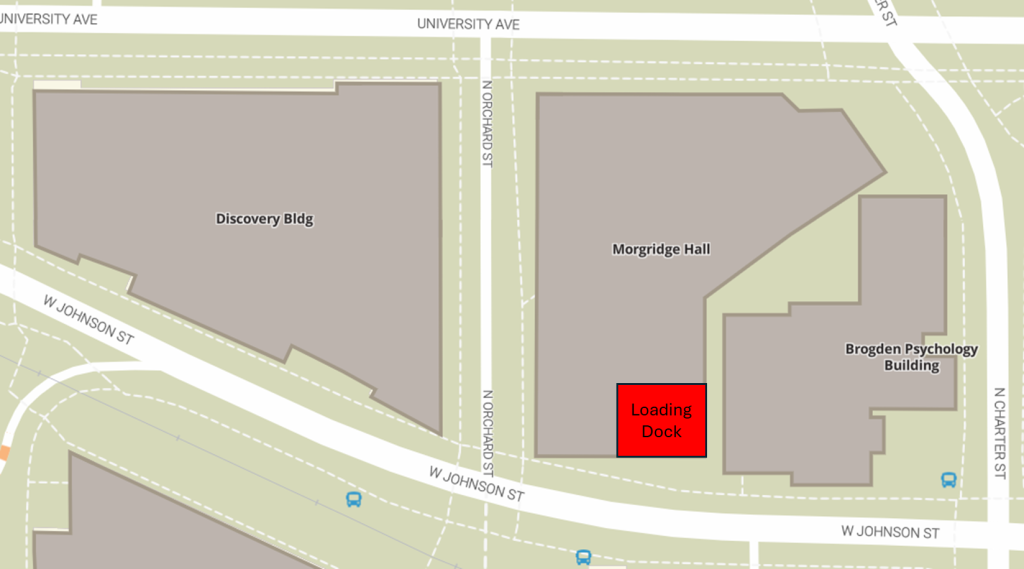
Click here for a document that you can share with vendors or suppliers.
The stockroom is in the lower level next to the main elevators. Click here to find out more about the supplies and services in the stockroom.
Here is a list of WID Shared Equipment, how it is scheduled, and who you should contact for use.